
This page covers the two files Schema Builder generates for developers, TypeScript types and a JSON Schema, and how to use them to type your code and check stored data.
Developer exports#
In Apps → Schema Builder, Developer exports (next to Create schema, or in a schema's actions menu) shows the saved schemas, not unsaved edits:
- TypeScript: one file for all schemas, not including the Schema Registry entry. Links are typed as
ContentfulLink, since Contentful doesn't resolve them. - JSON Schema: draft-07, for the chosen schema, including Repeater items.
- Sample entry: example
jsonFielddata built from default values and placeholders. It may not match pattern rules.
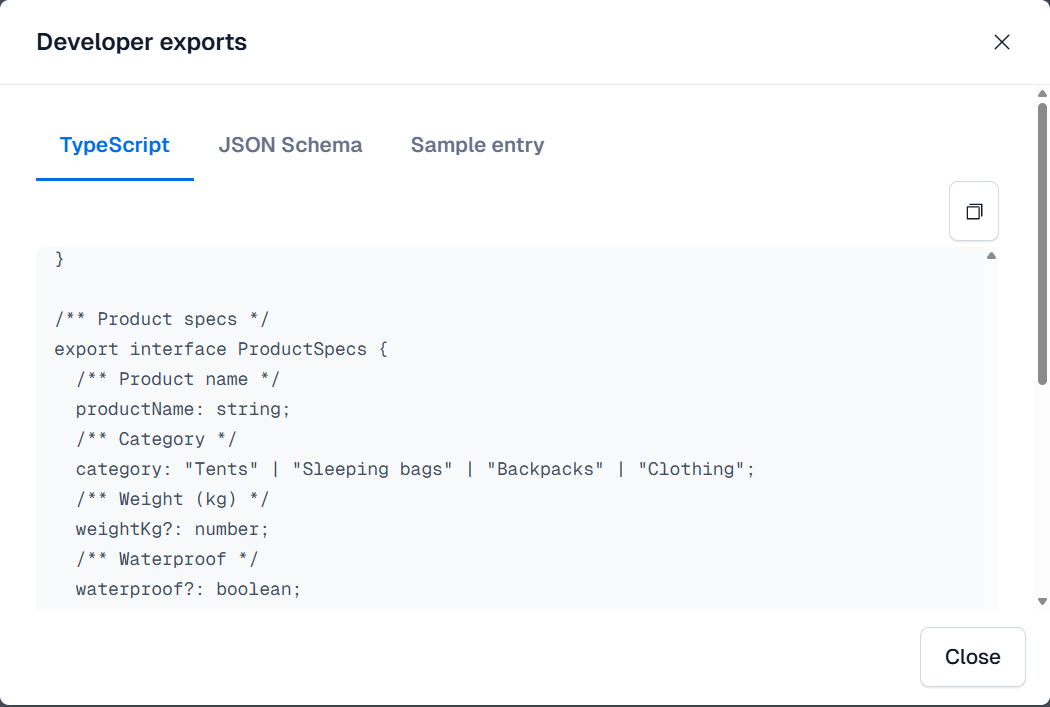
Export again after you change a schema: the files describe the schemas as they were when you opened the dialog.
Use the TypeScript types#
The sample's types.ts is the TypeScript export for the Fernhill demo schemas, pasted as exported. Each schema becomes an interface, and SchemaBuilderFields describes an entry's fields:
/** Product specs */
export interface ProductSpecs {
  /** Product name */
  productName: string;
  /** Category */
  category: "Tents" | "Sleeping bags" | "Backpacks" | "Clothing";
  /** Weight (kg) */
  weightKg?: number;
  /** Waterproof */
  waterproof?: boolean;
  /** Waterproof rating (mm) — Hydrostatic head, in millimetres. */
  waterproofRatingMm?: number;
  /** Specifications */
  specifications?: ProductSpecsSpecificationsItem[];
}

export type SchemaBuilderFields =
  | { title: string; type: "faqItem"; jsonField?: FaqItem }
  | { title: string; type: "heroBanner"; jsonField?: HeroBanner }
| { title: string; type: "productSpecs"; jsonField?: ProductSpecs };SchemaBuilderFields narrows on type, so checking it gives jsonField the right interface:
import type { SchemaBuilderFields } from "./schema-builder/types.ts";

function rating(fields: SchemaBuilderFields): number | undefined {
  if (fields.type !== "productSpecs") return undefined;
  return fields.jsonField?.waterproof ? fields.jsonField.waterproofRatingMm : undefined;
}A field with a showWhen rule is optional in the types even when it's required, because a hidden field can be empty. waterproofRatingMm above is one. Boolean fields are always optional, since a switch that was never touched has no value.
Validate stored data with the JSON Schema#
Data written through Contentful's API, or imported, bypasses Schema Builder. Check it with the JSON Schema from Developer exports and Ajv. Date ranges use the ajv-formats keywords formatMinimum and formatMaximum, so call addFormats(ajv, { keywords: true }). Other validators ignore those keywords.
Schema Builder doesn't validate hidden fields, so drop hidden values before you validate. visibleFieldIds is the sample's copy of the app's rule:
import Ajv from "ajv";
import addFormats from "ajv-formats";
import productSpecsSchema from "./product-specs.schema.json"; // Developer exports → JSON Schema
import type { Schema } from "./schema-builder/registry.ts";
import { visibleFieldIds } from "./schema-builder/visibility.ts";

const ajv = new Ajv({ allErrors: true });
addFormats(ajv, { keywords: true });
const validate = ajv.compile(productSpecsSchema);

export function check(schema: Schema, data: Record<string, unknown>) {
  const visible = visibleFieldIds(schema.fields, data);
  const shown = Object.fromEntries(Object.entries(data).filter(([id]) => visible.has(id)));
  return validate(shown) ? [] : validate.errors;
}We ran this against the Product specs schema: a stray waterproofRatingMm on a pack that isn't waterproof passes once it's dropped, and an unknown category fails.
Things to know
- The exports describe saved schemas. Export again after each change and commit the files with your website.
- Fields with a
showWhenrule, and all Boolean fields, are optional in both the types and the JSON Schema. - Pattern rules use JavaScript regular expressions, which Ajv also uses. A validator in another language may read a pattern differently.
- Next: Rendering entries.